Year / Make / Model fitment for Shopify
Shoppers pick their vehicle.
Your store shows what fits.
Spark Fitment adds a vehicle selector to your storefront and filters your catalog to confirmed fits — fewer wrong-part returns, faster path to checkout. Built simple and priced honestly, for real parts stores.
How it works
Three steps to a fitment store
Load your vehicles
Add Year/Make/Model entries by hand, or import your whole fitment database from one CSV — vehicles and product mappings in a single file, with a row-by-row validation report.
Map your products
Pick a vehicle and bulk-assign every product that fits it, down to the variant. Universal-fit items (mats, tools) always show without mapping.
Turn on the selector
One click in your theme editor places the selector. Shoppers pick their vehicle once and see only confirmed fits — on collection pages, search, and product pages.
On your storefront
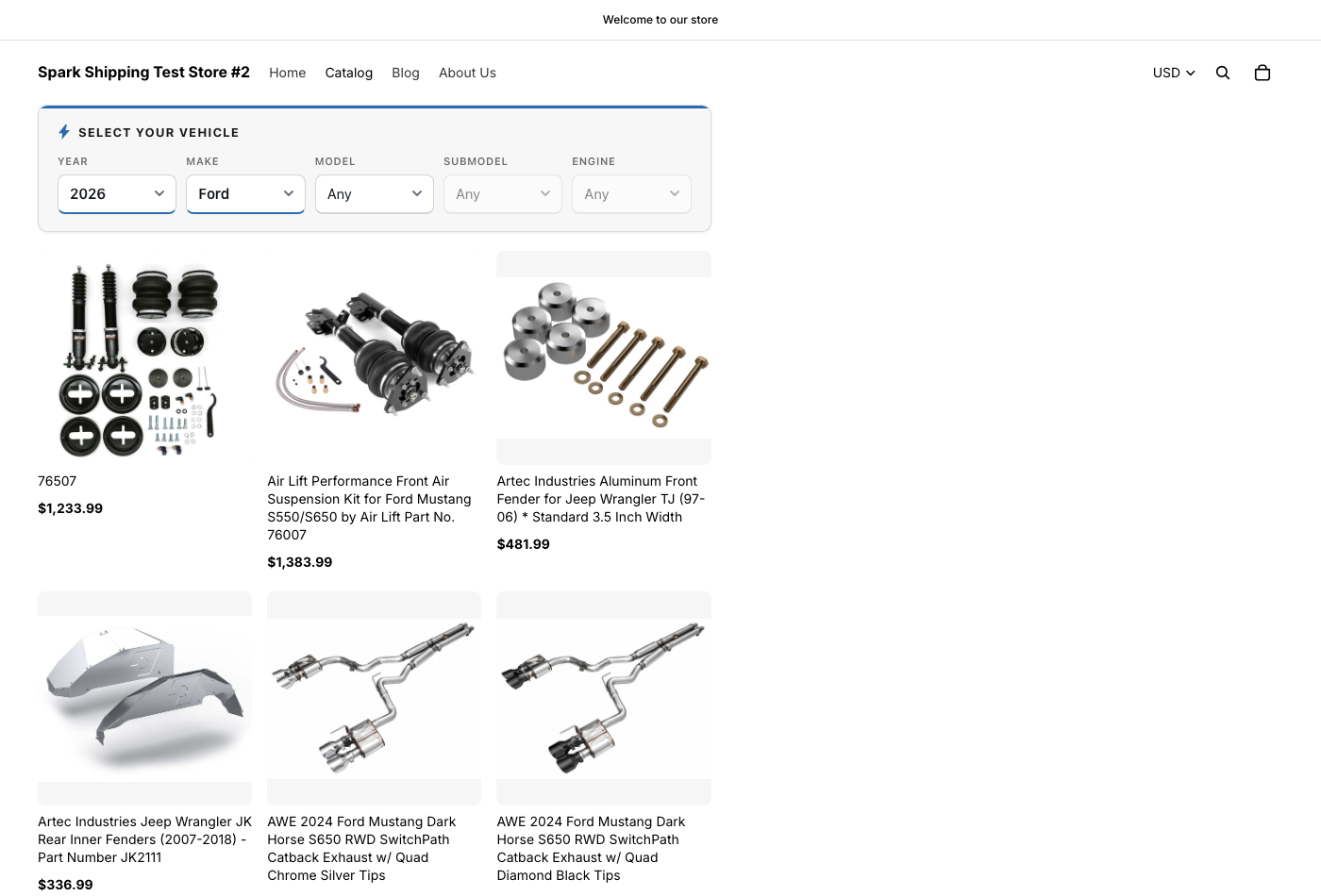
The selector, at work

Pricing
Priced by vehicles, not by surprises
Every plan includes every feature. The only difference is how many vehicle entries you keep.
Free
$0
Up to 5,000 vehicle entries
Growth
$50/mo
Up to 20,000 vehicle entries
Pro
$100/mo
Unlimited vehicle entries
Knowledge base
Common questions
What does Spark Fitment do?
It adds a Year / Make / Model vehicle selector to your storefront. A shopper picks their vehicle — say, 2026 Ford Mustang — and your store shows only the products you've confirmed fit it. Fewer wrong-part returns, more confident buyers.
How do shoppers use it?
The selector cascades: picking a Year narrows the Makes, a Make narrows the Models, with optional Submodel and Engine for precise fitment. Their vehicle is remembered as they browse, and on product pages the variant picker narrows to compatible options only.
How do I add my fitment data?
Two ways: add vehicles by hand and assign products with a couple of clicks, or bulk-import a CSV. One flat file does everything — each row creates a vehicle and maps a product to it in the same pass, with a row-by-row validation report when it finishes.
What's the CSV format?
Six columns: Year, Make, Model, Submodel, Engine, Product SKU. Submodel and Engine are optional. Put UNIVERSAL in the Year column to mark a product universal-fit. Export your data any time in the same format — that's also your backup.
What is Universal Fit?
A flag for products that fit every vehicle — floor mats, tools, cleaning supplies. Universal Fit items always show, no matter what vehicle the shopper selects, so you never have to map them against thousands of vehicles.
How does pricing work?
Plans are based on how many vehicle entries you keep — not SKUs, not products, not traffic. Free up to 5,000 entries, Growth ($50/mo) to 20,000, Pro ($100/mo) unlimited. Billing runs through Shopify, on your normal Shopify invoice.
What happens if I go over my plan's limit?
You get a 7-day grace period with notices in the app. If you're still over after that, the storefront selector pauses — your data is never deleted — and it reactivates the moment you upgrade or trim entries.
Will it work with my theme?
On any Online Store 2.0 theme, it's a one-click app block in the theme editor — no code. Older themes get a small copy-paste snippet, with instructions built into the app. On large catalogs the selector renders its own results grid, so filtering stays instant even with tens of thousands of products.
Will it slow down my storefront?
No. The widget is a single ~9KB script with no dependencies, and fitment lookups are served from a cache. If our service is ever unreachable, the selector simply hides itself and your store shows all products — it never breaks your storefront.
Is fitment per-product or per-variant?
Per-variant. One part often fits many vehicles, and one product's variants often fit different vehicles — Spark Fitment models both, and product pages narrow the variant picker to what actually fits.
What happens to my data if I uninstall?
Your fitment data is kept, encrypted, for 90 days after uninstall — so an accidental uninstall or a return from another platform doesn't cost you your catalog work. After 90 days it's permanently deleted.
Where do I get help?
Email support@sparkshipping.com — it reaches the team that builds the product. Include your store's .myshopify.com domain and we can usually see what you're seeing.
Put fitment on your storefront today
Free up to 5,000 vehicles. Set up in minutes, no code.
Install on Shopify